When I had this issue, it was fixed by disabling and removing the speech-dispatcher. Something to do with text to speech (I never use it but is sure to be a pain if you do need it) automatically doing things that corrupt the audio stream globally.
It does seem that way, however, in none of the AdaBoxes I've gotten from them have I had to sign up for their cloud services. That's where you think they would push it hard, but it just hasn't happened and I'm glad for that. There are usually a few samples that make use, but you always have the option to roll your own code on it and use their base libraries for interfacing with the hardware. It will be a sad (and probably disastrous) day when they bind their code to require cloud services especially considering some micros don't have wifi.
Adafruit offers a starter kit with a microcontroller, 64x32 led matrix, and some other doodads for ~$70 (https://www.adafruit.com/product/4812). It's really easy to tinker with. I made a clock that does some crappy visualizations and open sourced it here: https://github.com/kruffin/matrix_portal_gol It actually looks a lot like this Tidbyt (a box with a dot matrix).
The only thing it doesn't have is a RTC, so I just polled a time server every so often.
Also bought a Matrix Portal and have had a lot of fun with it! Dabbled in writing a raytracer for it, but I don’t know enough about ARM nor C++ to optimize it for decent frame rates. Now the thing runs a newton’s cradle simulator using Box2D, and that’s been a fun desk toy.
Neat. I'd love to see what that looks like (raytracer or cradle). Found an old Hack a Day from 2014 (https://hackaday.com/2014/11/25/ray-tracing-on-an-arduino/) where someone is raytracing on a 16Mhz micro. Should be faster on the 120Mhz portal, but it took almost 3 days :P
My favorite from that collection on map generation is by Herbert Wolverson: https://www.youtube.com/watch?v=TlLIOgWYVpI He goes over 5 or 6 different techniques that are easy to implement.
This may interest you; might not be what you were asking for. I haven't built one, but keep an eye on it and dream of free time to surface mount solder and poke around with it. The repo used to have a cost estimate and think it came out to around $100 but my memory may be fuzzy.
Why does it require that the server has password logins enabled? This seems contrary to every "secure your server" guide I've seen and opens your server up to the password guessing game. It seems like a cool product, but that's a huge non-starter.
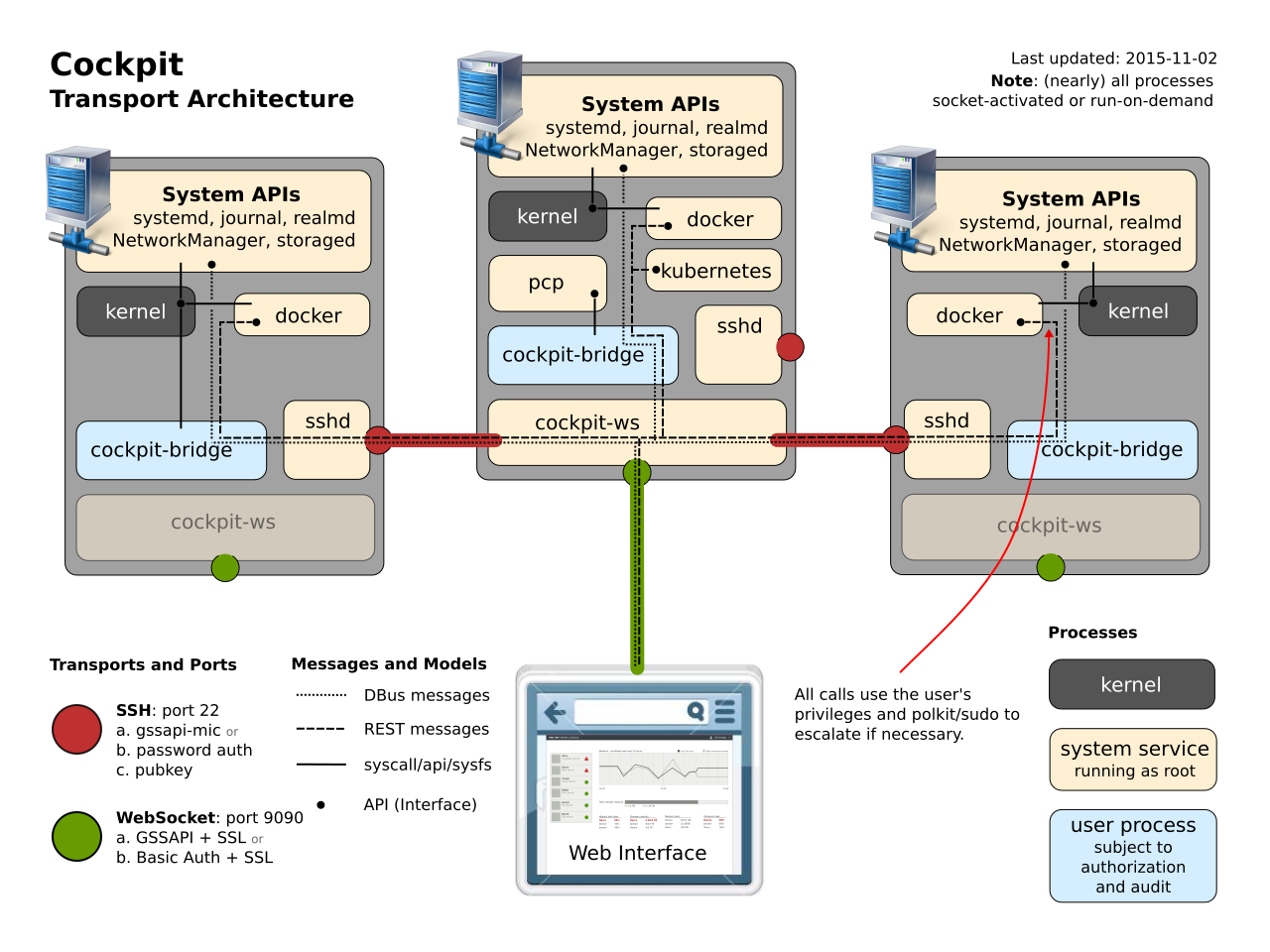
The target server will need to have password based authentication enabled in sshd. When this is setup for the first time, Cockpit will ensure that the user connected to primary server has the same password on the secondary server.
I don't think it does. That quote is from the section explaining how to configure "Password" authentication. i.e. to use Password authentication, you must enable it on the target server.
It then goes on to list how to use Kerberos or Public Key methods.
You are right, I missed the one liner above this that stated it needed one of these methods: [password, kerberos, or public key].
However, it does sound like if you use the docker image that you need password logins on the primary machine unless you modify the docker image to add a public key. I may just be reading wrong again though.
Reading again, it does look like the installation is limited in some way if you choose to use public keys and your user doesn't have the privileges (without sudo) necessary for some of Cockpit's commands it tries to run.
Note that when a user is authenticated in this way [public key] the authentication happens without a password, as such the standard cockpit reauthorization mechanisms do not work. The user will only be able to obtain additional privileges if they do not require a password.
You could run a dedicated SSH server listening on local host, accessed through a tunnel. Not ideal but not non starter either, if the benefits of Cockpit are that big.
The web server can also be run from the cockpit/ws docker container. If you are running cockpit on an Atomic Host this will be the default. In this setup, cockpit establishes an SSH connection from the container to the underlying host, meaning that it is up to your SSH server to grant access. To login with a local account, sshd will need to be configured to allow password based authentication. Alternatively you can setup a Kerberos based SSO solution.
AKA, it is up to your SSH server to grant access to the container.
Probably because these "security guides" just repeat what others said without any real consideration?
In fact, using key-based authentication just shifts the weak point from one server to another, and, if implemented incorrectly (let's login without passwords to several servers - how convenient!), it's a security disaster. People need to think rather than follow recommendations blindly.
"Common knowledge" is a big problem in the security industry, like you mentioned. It's common knowledge that you need a 32 character randomly generated password with special characters and numbers and mixed case, right? But actually that's less secure, and now security folks have to work overtime to convince people otherwise.
And it's common knowledge that passwords are super insecure and should be replaced, but oftentimes the people replacing them don't understand that it's possible to replace passwords with a less secure system, and don't have the skills necessary to judge that risk.
Key-based systems do have their risks. If I compromise your dev machine (probably using a simple password), I now have free access to all the machines your key unlocks.
Defense-in-depth is important, as well as a strong IAM system. You need physical security to protect your dev workstation, coupled with a strong login system to your machine, hopefully a VPN (locked with a physical token) or local network requirement to get onto your production servers, and then break-the-glass methods to check out permission to escalate your privileges when needed, followed with a keylogger for your admin session and attestation that your break-the-glass in production was necessary.
That being said, if you're looking for a replacement for logging into your production machines over the Internet with a simple password... key-based authentication is lightyears ahead of what you're doing. Passwords are far too easy to guess or brute force.
the part that gets me is that key based authentication is much, much more secure, as long as you have a passphrase. How many 'howtos' and other sites on the internet say to just create a key with no passphrase? Its right up there with the number of guides I see for deploying things on Redhat, that first have you disable selinux.
Yeah as someone who works in the security industry, the ubiquity of security awareness targeted at end users is both a blessing and a curse. It's a blessing because now many more people know what key-based authentication is. It's a curse because now people get mad when my report has a finding that their no-passcode single key authentication system is worse than the "use your RSA token to check out the constantly-revolving root password" system they just replaced.
Like when people use the phrase "two-factor authentication" without knowing what the three factors actually are and why they matter.
If you compromise my dev machine, you'll install a keylogger and sniff all my passwords. The only way I see that even passphrase-less keys are worse than passwords is if I physically lose the machine (and don't use full disk encryption).
I am sorry but your example of 32 character password chosen at random is not less secure to brute force. There are 95 type-able characters on qwerty keyboard. That's 95^32 possible possible passwords or about 2^210. Compare that to an AES-128 key. That's only 2^128 possible keys. So a truly random password of such length is harder to brute force than AES-128.
The real reason is passwords are weaker is first and fore most people. People reuse passwords or choose ones that are too short or simple that brute force becomes possible. If passwords where chosen at random and of proper of length they can be equally as strong as a key. Further, passwords basically functions the same as a key symmetric cryptography. People just don't like to memorize long random strings. (Although many apply key stretching since passwords may be of lower entropy).
Second when it comes HTTP it really only supports basic and digest authentication which is based on MD5, and further is susceptible to offline brute force attacks, and a down grade attacks to basic without TLS.
Thusly, most websites just send your password over TLS. However, because each site basically can handle passwords however they want they can store them in plain text. Secondly, if your TLS sessions is compromised you sent the password over over that connection it can be compromised. Sadly, the browsers don't support J-PAKE which by the way has an RFC.
I guess my point is password authentication can be just as secure, and really they are just shared secret crypto-systems. Problem is people choose low entropy passwords first and foremost. So just generating a key and saving locally avoids that issue.
Websites (HTTP) can use client X509 side certs as authentication and this gets rid users choosing bad passwords. However, if browsers implemented J-PAKE you don't have to worry about accidentally visiting the site via plain text will comprise your password or a comprised certificate authority. You could always validate the certificate yourself since we don't have something like J-PAKE in place.
For SSH long passwords can be just as strong, but you must verify the fingerprint matches your servers else you may get MITMed. Although if people see a server with SSH using password logins. They may try to brute force the password which may be annoying for the system admin. So the system admin enables key based authentication stop people from trying. Even though you have a high entropy password and your not worried about a brute force attack. The attacker does not know that so they will try anyways.
I'm neither a sysadmin nor a securyt expert, so I might be terribly wrong, but, as I understood it, password-based authentication was undesirable because the attacker could try to brute-force it.
Key-based auth doesn't have this flaw so it's arguably safer in that it has one less entry point.
On the other hand, not sure I fully understand your argument. You are saying that not being vulnerable to password brute-forcing is not enough since you could still hack the server? or what exactly do you mean by "just shifts the weak point ... to another"?
>what exactly do you mean by "just shifts the weak point ... to another"?
I'm not the person who made that argument, but I can give you my reasoning to support it.
Your key is on your laptop and unlocks your server, now your server is safe. But your laptop is just secured with a password. I brute-force the password on your laptop, and now I have no barriers preventing me from accessing your server. Your server is secure, sure, but the risk was just pushed back to your laptop which may be more or less easy to compromise than your server (depending on the threat).
I'm not arguing that key-based authentication isn't a good step forward. If you're using passwords on your Internet facing servers, stop doing that and start using keys. But you also have to protect your keys and any machine those keys are installed on, otherwise you're just shifting the weak point to another machine.
> But you also have to protect your keys and any machine those keys are installed on, otherwise you're just shifting the weak point to another machine.
I’m okay with this, personally. What’s riskier: a public server listening on port 22 for any SSH traffic or my personal laptop which doesn’t accept random requests from the entire internet and is almost never out of my sight? And even if someone compromised my machine (e.g. theft), they probably don’t care or even understand what SSH keys are; they’ll probably just wipe the thing and sell it on the black market.
That’s not a good reason to ignore sound security practices, but threat model-wise, my laptop is much less likely to be targeted and successfully compromised physically by someone who wants to SSH into my build server.
Your laptop, maybe. It sounds like you understand security, which is good. Not everyone does. I'll give you an example:
I have a picture I like to use in my presentations where I was at a mostly-empty family restaurant and the person sitting next to me (alone) had their laptop sitting out and went to the bathroom without even locking the screen. In 15 seconds I could have popped in a USB drive and copied all of his SSH keys (and more) without anyone ever noticing. It could have been done before he even reached the bathroom door, let alone came back. I don't think you would do this, of course, but some people do. And your coworkers might.
On top of that, about 25%-30% of security incidents are caused by insider threats. Considering how easy attacks over the Internet are, that's an absolutely massive number. Even if your laptop never leaves your desk, it's entirely possible someone within your company might want to do some harm to you or the company and it might be the desktop support technician hooking up your new monitor while you grab another cup of coffee.
Your point about what's riskier is completely true: if you have Internet-facing servers using passwords, stop that and use keys. But when you do that, you need to study up on the new risks you may not be aware of. Security shouldn't just be a curtain you close. Companies/people who don't understand this love paying me shitloads of money to explain it to them :)
Why would you not have a passphrase on your key? Passphrase encryption is the default in ssh-keygen and probably every other ssh key generation utility. Having a magic file that grants access to a server scares the crap out of me -- but use the passphrase feature and it's far more secure than password auth.
You'd be surprised. ssh-keygen allows you to just hit enter and bypass the passphrase with no hoops to jump through and insufficient warning (IMO). Maybe that should be changed. But right now it's all too easy and convenient.
> Key-based auth doesn't have this flaw so it's arguably safer in that it has one less entry point.
This is exactly what people think when reading the guides. In fact, it's not that there is one less entry point, but this entry point was moved and now exists on another machine together with the key. And since many people use one workstation to log in to several servers, you now have one single point of failure (an equivalent of using one password for all servers).
I'd appreciate a good argument apart from downvoting. In every discussion I had about it with fellow sysaddmins we agreed the convenience of passwordless logins can't be considered a security feature in spite of what someone wrote and what others repeat.
No glove fits everyone. There are many answers to the problem and each depends on the set of circumstances in which your service exists. Security is, simply put, risk management.
To put things into a context: the 'average Joe' user is rarely going to be targeted specifically - which means that the biggest attack vector of the average user is brute forcing by bots and phishing attempts or maybe a key/password stealing malware.
Hence your argument that 'key-based auth' just shifts the attack vector is partially incorrect because automated attacks do not focus on a specific target but on a specific vulnerability - like password guessing bots for example which move from IP to IP and try a bunch of simple password. If these passwords don't work, the bots will not try to hack a dev's workstation, they'll just find an easier target.
So for the average user it makes sense to move to key based auth because it will remove a big attack vector. It is still possible that the workstation where the private key resides becomes compromised, but thats another attack vector that needs to be addressed by different security methods (eg, passphrase on the private key).
Just wanted to say a big thank you for this site. I used it when trying to figure out how to hook up an RFID reader to the Pi. It was suprisingly hard to find the pinout, but finally found your site. This is what I put together: https://bitbucket.org/kruffin/rfid_play


https://tqdev.com/2021-firefox-ubuntu-crackling-sound