I do. I used to consider it a necessary evil - I hated unit testing, but I hated not unit testing more. But then I started using the green bar as my first indication that the code works. Everybody likes seeing their code work, so naturally I liked seeing the green bar. I'd just write a test and have it pass instead of running the program.
(Naturally, I'd run the program afterwards to make sure it really worked - but if it didn't, I could just consider that a bug in the tests, write the test, fix the code, and close the bug. Everybody likes closing bugs, so there's the reward...)
Doctest is great too, since it's pretty common to use the Python interpreter as the first indication that your code works. Then you just paste the session transcript into the docstring, and you're done.
The idea is that you write a few lines of code, test it (most likely you'll get red), and you keep fixing your code until you get green, and only then you proceed to the next task.
As far as I know, it started with jUnit on Eclipse, and then others implemented the concept on other languages / IDEs.
In Smalltalk/Squeak, you can write the Unit tests and the code you're testing alongside each other, live, from the debugger. It certainly makes things easier being able to see the live objects, in deciding how they should behave. And by testing the objects in situ, you pretty much know your code is going to run as you expect.
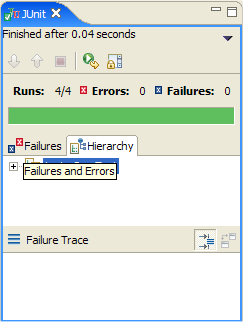
It's a feature in some implementations: a progress bar advances while your tests execute, and finally turns red if any test fails, or green if all passed.
The term "green bar" is used, by extension, to refer to the notification that all tests passed, even in colorless console-based frameworks.
For anyone reading this w/ a .NET/C#/Visual Basic bend, NUnit is one of the big unit testing tools (and yes you get the big green bar [or you aspire to]). VS2008 has unit testing built in.


(Naturally, I'd run the program afterwards to make sure it really worked - but if it didn't, I could just consider that a bug in the tests, write the test, fix the code, and close the bug. Everybody likes closing bugs, so there's the reward...)
Doctest is great too, since it's pretty common to use the Python interpreter as the first indication that your code works. Then you just paste the session transcript into the docstring, and you're done.